MoreLogin Cloud Phone gives global marketing teams a practical way to move localization .20out of spreadsheets and into the mobile environments where campaigns actually appear. Localization is not accomplished until content has been checked inside the target app, under the correct regional account, with the required media and links.
Consider a brand launching a similar campaign in Brazil, Japan, and Germany. The central idea is shared, yet the mobile execution is not. Captions have various lengths. Calls to action sound natural in one language and awful in another. App interfaces, product references, disclosure requirements, and publishing schedules may differ. A campaign that looks consistent in a planning deck can feel completely different on three mobile screens.
That difference between approved copy and real mobile presentation is where localization often collapses. A cloud phone workspace can help teams treat each market as its own operating context without compromising on governance, access, and campaign direction.
One Campaign, Three Mobile Realities
Global teams often define a campaign as a single project with several translated versions. Mobile platforms reveal the weakness in that model. It is reconstructed inside different account, language, app, and audience conditions.
The Brazilian operator may require a longer caption and a market-specific landing page. The Japanese version may need a different line break so important wording remains visible before truncation. The German team may need to ensure that the product name, price format, and disclosure are stated correctly in the app. These problems are rarely obvious in a source-language spreadsheet.
The process becomes even harder when publishing access is tied to personal devices. Files switch through private chats, employees switch between accounts, and the central team cannot easily find whether a regional post is drafted, scheduled, live, or waiting for a correction. Localization quality then relies on individual memory rather than a visible operating model.
Localization Fails at the Last Meter
Most localization workflows pay more attention to words and less attention to the final mobile interaction. Yet the last meter—the distance between passed translation and the publish button—is where language meets interface.
Text Can Be Correct and Still Look Wrong
A linguistically accurate caption may be too long for a preview. A subtitle may stay behind an app control. A translated graphic may use a font that becomes hard to read on a smaller screen. An emoji, date format, or unit of measurement may hold a different meaning in the target market.
These are not just design defects. They affect whether the audience understands the offer and whether the post feels native to the channel. The final tick therefore belongs in a real Android environment, not only in a desktop document or editing canvas.
This is specifically important when a campaign uses several content formats. A static image, short video, story, and commerce post may all use the same message but reveal it through different interface constraints. Mobile validation supports the team in seeing those differences before publication.
The Active Account Is Part of the Translation
Localization also has account context. The correct words published from the wrong regional account are still an operational fault. The same is true when the right asset is paired with an outdated bio link, a wrong store destination, or an app session prepared for another market.
A regional environment should therefore connect language, account, network configuration, installed apps, and ownership. When these things stay together, operators spend less time rebuilding context for each campaign. They can focus on the local decisions that need judgment.
The Market Room Model
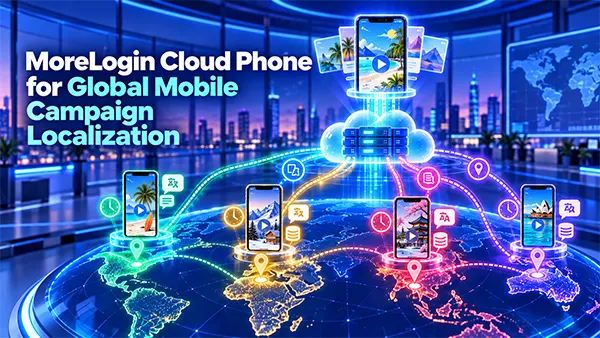
A useful way to organize multilingual mobile work is to make a “market room” for each operating context. A market room is not a physical office. It is a virtually assigned combination of people, Android environments, assets, permissions, and publishing regulations for one region or brand account.
One Android Workspace per Operating Context
Each market room should have a recognizable destination. The title can reflect the brand, country, channel, and responsible team. Groups and teams can then help managers see which environments belong to a launch without mixing out-of-context accounts.
The Android workspace should contain only what the operator requires for authorized work. Approved applications, campaign files, reference captions, and relevant account access stay associated with that context. If responsibility moves from one professional to another, the operating environment does not have to move through a private handset.
This idea also makes exceptions easier to see. If one market requires a different application version, publishing window, or proxy configuration, the variation can be documented against that environment instead of buried in a general campaign thread.
Central Rules, Local Judgment
Market rooms do not mean every region works independently. The central group still defines the campaign promise, visual identity, non-negotiable claims, approval process, and measurement standards. Local operators decide how those regulations should appear naturally inside their market.
Excessive central control can create literal translations that sound foreign. Excessive local freedom can hurt brand consistency. A well-designed workflow gives regional specialists room to adapt presentation while keeping the strategic boundaries clear.
The MoreLogin workspace can support this balance through team access and assigned cloud phone environments. Managers can handle operating contexts and control who may enter them, while regional employees work remotely without circulating shared device credentials through informal channels.
How MoreLogin Cloud Phone Supports the Model
MoreLogin Cloud Phone can provide the Android layer inside the market-room model. Teams can handle remote mobile environments, organize them with groups and tags, assign access, configure proxies, and manage applications or campaign files. The goal is not to create as many devices as possible; it is to give every authorized workflow a stable and understandable place to occur.
For campaign preparation, files can be delivered to the specific environments instead of being downloaded separately to personal phones. Operators can use the target app, review the translated creative, and confirm account context. When repetitive tasks are genuinely standardized, synchronization, RPA, scheduled tasks, APIs, or ADB-supported workflows can help decrease manual handling.
Those capabilities should be provided selectively. A small regional launch may need only remote access, clear naming, and file delivery. A bigger program may benefit from integrations and automation. The operating model should describe the technology used, not the other way around.
Automation Should Remove Repetition, Not Responsibility
Localization contains repeated actions, but it also contains limits. Uploading an approved file to several environments may be repeatable. Deciding whether a translated call to action sounds persuasive is not. Launching an app across chosen devices may be standardized. Responding to an unexpected platform warning needs a person who understands the account and campaign.
Teams should automate the static layer and keep human review around meaning, risk, and release. An approved workflow might prepare applications and assets in advance, then pause for a regional operator to check the final screen. Another workflow may schedule routine content while saving product launches or regulated messages for manual confirmation.
The same rule applies to synchronization. Performing a common action across environments can save time, but identical clicks do not confirm identical outcomes. Each regional account may present different prompts or content states. Operators should confirm the result in every relevant environment instead of assuming the action alone proves success.
What Success Looks Like After Launch
A localized post is complete only when the team can connect the live outcome to its approved source. The campaign record should display the market, account, asset version, publishing time, operator, and verification evidence. If a platform is still working on a video or a link needs correction, that status should remain visible.
This feedback also enhances future localization. A team may discover that one language repeatedly needs shorter opening lines, that a specific content format creates subtitle problems, or that regional approval appears too late for comfortable mobile review. Over time, the organization creates a practical memory of how campaigns behave on mobile screens in different markets. Local knowledge becomes reusable without changing every campaign into a rigid template.
A Stronger Way to Scale Global Mobile Publishing
Global campaign scale should not mean pushing identical files through many accounts. It should mean repeating a reliable method for adapting, validating, and releasing content in every operating context.
Cloud phones can encourage that method by separating regional workspaces while keeping them accessible to an authorized team. The central organization gets visibility and continuity; local operators gain the ability to judge how content appears in their market. Technology cannot decide whether a translation is culturally right, and it does not replace platform policies or local legal review. Teams stay responsible for using authorized accounts, respecting applicable rules, and applying automation carefully.
Final Thoughts
The strongest localization workflows treat the phone displays as part of the message. They do not stop when a quote has been translated, or a graphic has been exported. They continue until the content is right inside the destination app, under the intended account, and verified after publication.
For teams building this operating model, the suggested starting point is one campaign and two or three regional environments. Create the market rooms, assign owners, test the handoffs, and document what changes between regions. When the workflow is good, teams can create a MoreLogin account and expand the model without giving up on the local context that makes worldwide content effective.
Frequently Asked Questions
1. How does MoreLogin Cloud Phone support global mobile campaign localization?
Ans: MoreLogin provides remote mobile environments where teams manage regional accounts, organize campaign files, and publish localized content to support global mobile campaign localization.
2. Can automation improve global mobile campaign management?
Ans: Automation can improve global mobile campaign management by reducing repetitive tasks like uploading files, scheduling posts, and managing applications while keeping human review for important decisions.
3. How can teams measure the success of a localized mobile campaign?
Ans: Teams can track publishing records, verify live content, monitor platform status, and use regional feedback to improve future campaigns to measure the success of a localized mobile campaign.