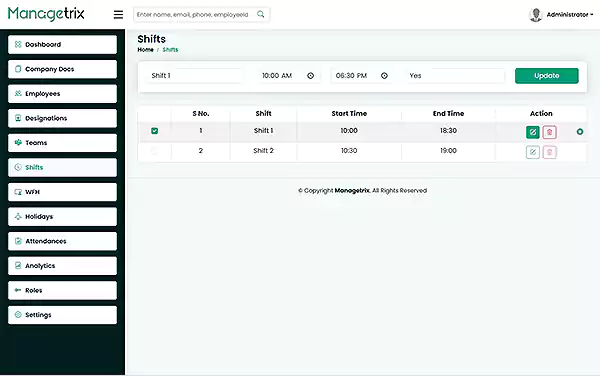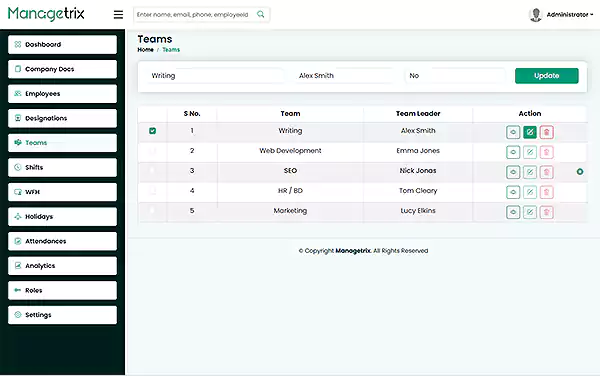
Managetrix lets you organise your employees into teams, give each team a leader and keep every person’s working days in the same system. It is self-hosted and bought once, with a one-time licence instead of a monthly fee for every user.
Try demo See PricingWhat Is Team and Shift Management Software?
Team and shift management software lets businesses organize their staff in teams and manage their hours of work. With such a solution, you can keep all your teams, their leaders, and their hours in one place.
It is different from a shared spreadsheet rota, which breaks down as soon as several people edit it, and narrower than a full HRIS, which usually also covers payroll, benefits and compliance. For other HR terms, see the HR glossary. Team management is one module of Managetrix; the complete employee record is covered on the Employee Management page.
Why Spreadsheet Rotas Stop Working as You Grow
A spreadsheet rota works while the team is small. Once there are several teams and several people editing the same file, it starts causing more problems than it solves.
When that person is on leave, nobody else knows where the latest version is. In Managetrix, teams and their leaders live in the system, where everyone with access can see them.
Copies get emailed around and edited separately. Managetrix keeps one team list, so there is no second copy to fall out of date.
An update made on Friday can easily miss the person working on Saturday. When a team is updated in Managetrix, everyone who opens it sees the same version.
In a shared file it is hard to tell who made the last edit. In Managetrix, only people with the right permissions can change team details.
Build Your Team Structure in Minutes
Managetrix provides a simple way to organise employees into teams. In the team screen, you see the list of teams, making it easy to see each team and its leader.
- S.No — The serial number of the team.
- Team Name — The name of the team.
- Team Leader — The person leading the team.
- View — An option to view more details about the team.
You can name teams based on your business structure. For example, SEO, Development, Writing, HR / BD, and Marketing.
You can create teams based on your company’s needs. One person can also lead more than one team.
As your company grows, you can add new teams, rename existing ones, or move employees between teams whenever needed.
To explore more employee management features, visit the Employee Management page.
Give Every Team a Leader — and Give That Leader a View
In Managetrix, you can choose the leader when creating the team and change them later if needed.
A team leader is also an employee in Managetrix and can have a designation such as “Team Leader.” To learn more about designations, visit the Roles and Designation page.
Assigning a team leader makes it clear who is responsible for each team. The leader’s access to information depends on their user permissions, which can be managed in the User Roles & Permissions Management section.
Set the Hours Each Team Works
For managing employee working hours, the company should clearly know when employees start work.
- Single System Integration:
Managetrix connects working patterns with attendance records—working day and attendance information are maintained within a single system. - Punch Records and Details:
Each working day records punch-in and punch-out times. The attendance report also displays whether an employee worked from the office, home, or did overtime. - Weekends and Holidays:
Weekends are recognized automatically and are not counted as missed days—the status simply reads “Weekend.” Declared holidays use the company’s holiday list, managed via the Leave & Holiday Management page.
Managing hybrid teams doesn’t mean you have to manage office and remote employees separately in different records. Managetrix enables you to handle both within the same team and attendance system.
On remote working days, all basic attendance details—such as date, punch-in time, punch-out time, and day status—are recorded. The “Worked-From” field shows whether the employee was working from home or in the office. This unified approach works well for businesses offering both work-from-home and office options, as work records are not split across different systems.
The WFH log also includes a clips count and a selfie column for each remote day. Details on how this monitoring works are available on the Smart Work From Home Monitoring page.
How Teams and Shifts Connect to the Rest of Managetrix
Employee attendance records can be organised based on the teams they belong to, making it easier to manage attendance by team.
Remote working days are treated the same as office working days, as the same attendance records are maintained.
Per-person monthly totals for late arrivals, overtime, absences and half days, shown side by side for the selected month.
Self-Hosted, Bought Once — Not Per User, Per Month
Managetrix is self-hosted, so your company can keep all employee and team data on your own servers and databases — giving you complete control over storing and managing your data.
Managetrix uses a one-time licence, not monthly fees per employee. After purchase, there are no ongoing user or per-seat subscription costs.
Most employee management tools charge you every month for each user. Managetrix offers permanent ownership — bought once, in three licence tiers, with no repeat billing.
For available licence options, visit the pricing page.
Explore Managetrix’s complete employee management features at Employee Management page.