
Every year on 31st of January, employers are required to send the Form W-2 to the employees, which is an official deadline laid out by the Internal Revenue Service (IRS). In most cases, employees receive their Form W-2 by early to mid-February, allowing ample time to fill out and submit the form.
These forms are used to report the amount made by the employees and the Social Security and Medicare taxes that were withheld during the given period. Going above and beyond the procedural formality, W-2 forms are crucial for filing taxes. This article covers an in-depth understanding of W-2 forms, when do W2s come out, how to fill out the form, and common mistakes to avoid.
Understanding What is Form W2: Wage and Tax Statement
A W-2 Form, also known as the Wage and Tax Statement, is an Internal Revenue Service (IRS) document, sent by the employer to the employee on January 31 every year. The Form W-2 is used to report an employee’s annual earnings and taxes withheld to the government.
The employer is required to file Form W-2 with the Social Security Administration (SSA) by the end of January and report a copy to the IRS.
Common Query: How much money do you need to make to get the Form W-2?
If an employee is earning more than $600 annually, then they are eligible to receive Form W-2 from their employers. However, contractual individuals are not considered employees, and hence, they are provided with a Form 1099, instead of a Form W-2.
When Do W2s Come Out? Key Dates and Timeline
If you’re a beginner and wondering, “When do W2s come out?”, then 31 January is the date when employers generally send W-2 forms every year. This deadline is prescribed by the Internal Revenue Service (IRS), which requires employers to provide W-2 forms to employees to whom they have paid salaries, wages, and other compensations.
However, if the deadline falls on Saturday, Sunday, or a legal holiday, then the deadline is extended to the next business day.
Important Dates and Deadlines for Filing W-2
Here are some important dates and deadlines you should keep in mind about the Form W-2:
| Item | Deadline Dates |
| Employers sending W-2 Forms to Employees | 31 January |
| Employers filing W-2 for sending to SSA | 31 January |
| Employee’s Receipt of W-2 Form | Early-Mid February (1-15 February) |
| Follow-Up With Employer or Manager | Mid-February (15-20 February) |
| IRS Assistance, If NOT Received | Late February |
| Tax Payment Deadline or Extension Request | April 15 |
Different Copies of W-2 Forms
There are multiple copies of the Form W-2. Here’s everything you need to know:
| Copy | Sent To |
| A | Sent to the Social Security Administration (SSA) |
| B | Filed by the employee with their federal income tax return. |
| C | Employee’s personal records; it should be kept for at least 3 years. |
| D | Employer’s personal records; it should be kept for at least 4 years. |
| 1 | Copy filed with the state, city, or local tax department. |
| 2 | Employee’s copy of the state or local tax department return. |
How to Fill Out W2 Forms: Box-By-Box Breakdown
Although filing out the W-2 forms can be confusing, it is simple when you have the right documents and information about what to fill in each box. It requires important details, like total earnings, taxes withheld, and other information.
Here’s a complete box-by-box breakdown of how to fill out the W2 Form:
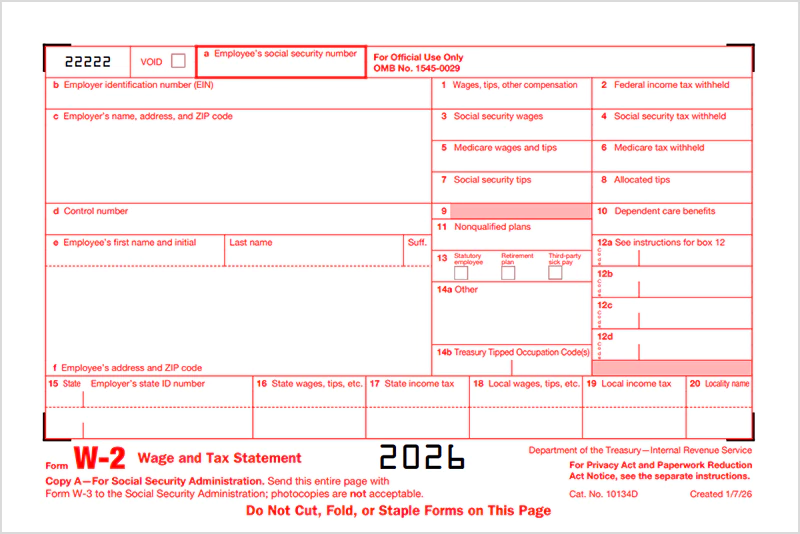
Boxes A-F
Here’s how you can fill boxes A-F:
| Field | What to Enter |
| a. | Employee’s Social Security Number: Nine-digit number with NO dashes |
| b. | Employer’s Identification Number (EIN): Nine-digit IRS business tax IRD. (Important: Do not confuse EIN with Social Security Number.) |
| c. | Employer’s Name, Address, and Zip Code: Exact legal name registered with IRS and complete business address. |
| d. | Control Number: “Optional” internal tracking number |
| e. | Employee’s first name, middle initial, and last name, exactly as on the social security card. |
| f. | Employee’s most recent home address. |
Boxes 1-20
Here’s how you can fill boxes 1-20:
| Box Number | What to Fill | Tips and Mistakes to Avoid |
| 1. | Wages, Tips, Other Compensation It includes regular salaries, bonuses, tips, and taxable benefits, such as life insurance over $50,000. | It excludes pre-tax benefits, such as 401(k) and HSA contributions. |
| 2. | Federal Income Tax Withheld: Federal income that is withheld from the employee’s paychecks during the year. | It is usually based on Form W-4. |
| 3. | Social Security Wages: A part of wages subjected to social security tax, capped at $1,84,500. | It includes pre-tax contributions, such as 401(k). |
| 4. | Social Security Tax Withheld: 6.2% of the wage earnings. Total is 12.4% (6.2% employee’s + 6.2% employer’s) | (Important: Do not enter the employer’s share here.) |
| 5. | Medicare Wages and Tips: The total wages and tips that are used for medicare tax. | |
| 6. | Medicare Tax Withheld: The amount of earnings deducted for medicare tax. It is generally 1.45% of income. +0.9% if income is higher than:
| Employers must match the 1.45%. They are NOT required to match an additional 0.9%. |
| 7. | Social Security Tips: Fill in the amount of tips that the employee reported to the employer. These tips are to be included in Boxes 1 and 5. | The sum of Box 7 and Box 3 should be equal to Box 1 (if there are no allocated tips) |
| 8. | Allocated Tips: If the reported tips are below the IRS-approved standards, then the employer can estimate additional tips and add them here. | Allocated tips are NOT included in Boxes 1, 3, 5, and 7. |
| 10. | Dependent Care Benefits: Fill in the amount paid by the employer for dependent care expenses:
| Dependent care benefits under $5,000 are non-taxable. ($2,500 is for a married couple filing separately) If more than $5,000 are allocated, then the excess should be reported in Boxes 1, 3, and 5. |
| 11. | Non-Qualified Plans: It includes the specialized retirement needs and plans for executives and selected employees. | It should be mentioned in Box 1 as well. |
| 12. | Coded Compensations: Report the coded compensations, such as 401(k), HSA, health coverage costs, and more. | Refer to the IRS code list to understand each entry. |
| 13. | Checkboxes:
| No values are to be added in the boxes. |
| 14. | Others: It includes other compensations, such as union dues, educational assistance, and State Disability Insurance (SDI) assistance. | |
| 15. | Employer’s State ID and number: Enter the two-letter state abbreviation and state ID or EIN. | If you work in a state without income tax, then leave this box blank. |
| 16. | State Wages, Tips, etc Report the employee’s wages that are subject to state income tax. If the employee has worked in multiple states, then enter the details about each state in a separate line. | It does NOT need to match with Box 1, due to state-specific rules. |
| 17. | State Income Tax: Enter the amount withheld for the state income tax from the employee. | Leave the box blank if no state income tax is withheld. |
| 18. | Local Wages, Tips, etc Report the amount of the employee’s salary that is subject to local income tax. | Leave the box blank if not applicable. |
| 19. | Local Income Tax: Mention the amount withheld for local taxes. | If not applicable, you can leave the box blank. |
| 20. | Locality Name Enter the name of the locality or the local tax jurisdiction. |
What Happens If You Miss the W2 Form Deadline?

Missing out on the W2 deadline can be common, and gathering all your tax numbers and figures can be time-consuming. You can directly contact your employer or HR if your employer has missed out on sending the W2 form. Here’s everything you should know about the deadlines and the steps you can take to ensure timely tax filing:
1. If Your Employer Missed the W-2 Deadline
Employers are generally required to send out W-2 forms by January 31 each year. Hence, it is best to wait till early or mid-February before taking action. However, if February has passed and you still haven’t received the W-2 form, then it is time to take action and follow the steps given below:
Step 1: Contact Your Employer or HR (February 1- February 14)
The first step is to contact your employer or HR and track down why the W-2 form has not been shared, and request a copy of your W-2 form. Ensure that your email address or home address is correct if the W-2 form is sent via email.
Sometimes the issue can be incorrect contact details. If the employer confirms that it has been sent, then you can wait for a few extra days.
Step 2: Contact the Internal Revenue Service (IRS) (After February 14)
If you still haven’t received your W-2 form by the end of February, then you can contact the IRS toll-free number or visit the IRS Taxpayer Assistance Centre (TAC) for help. You need to provide:
- Your name, address, zipcode, and contact details
- Employer’s contact details, name, and address.
- Dates of employment for this particular employment.
Step 3: Use the Alternative Form 4852
Alternatively, if your employer has failed to provide Form W-2 and the deadline is around the corner, you can use Form 4852 as a replacement. Gather the necessary documents, such as payroll records, year-end pension statement, and final pay stub.
2. If Employee Missed the Deadline
If an employee is unsure about their tax income and numbers, then they can file for an extension via Form 4868, Application for Automatic Extension of Time to File U.S. Individual Income Tax Return.
However, completely failing to adhere to the deadline may impose penalties. In 2026, IRS fines for potential delays in W-2 form filing include:
| Timeframe for IRS Fines for W2 Delay in 2026 | Penalty Amount |
| Up to 30 Days Late | $60 |
| 31 Days Late Through August 1 | $130 |
| After August 1 or Not Filed | $340 |
| Intentional Disregard | $680 |
Related Tax Forms You Should Know: W-4, 1099, and W-3
It is essential to have information about the commonly related tax forms, such as Form 1099, used for freelancers and independent employment contracts, and Form W-4, to let your employer calculate the potential deductions from your paycheck. The most important is Form W-3, which must accompany Form W-2 when filing with SSA.
Here are complete details about the related tax forms:
- Form 1099
Form 1099 is an informational tax return that reports the income earned outside of a regular W-2 job. Any income reported in the situation of freelance work, independent contracts, royalties, commission, online transactions, rents, and more, is reported by Form 1099 sent by the employer.
Difference between Form W-2 and Form 1099
A W-2 Form is for the regular employees, where the taxes are deducted from your salary automatically by the employer.
A Form 1099 is generally for freelancers and independent contractors, who are not regular employees but provide their services to the business. Taxes are not deducted automatically by the employer. - Form W-4:
A W-4 form is generally completed by employees when they start working for a company. Form W-4 is filled out to let your employers determine how much federal income tax to withhold from each of your paychecks.
- Form W-3:
A W-3 Form, also known as the Transmittal of Wage and Tax Statements, is a cover sheet or a summarized report that employers send along with the employees’ W-2 forms. It summarizes the total earnings and withholdings mentioned in Form W-2 by the employer.
Important Note:
Form W-3 should always be accompanied by Copy A of the Form W-2 when filing with the Social Security Administration (SSA).
If you’re filing electronically, then a separate copy is NOT required; the system generates a copy on its own.
Suggested Reading: 10 Certificate of Employment Samples for Official Purposes
Common W-2 Form Mistakes to Avoid
Avoiding the formatting errors, entering incorrect employee and employer details, using the wrong form year, and missing the deadline are some of the common mistakes to avoid while filling out the W-2 form.
Here’s everything you need to know:
- Missing the deadline is a common mistake that you should avoid; otherwise, it attracts a penalty of $60 that can reach up to $680.
- Avoid the common formatting errors, such as decimals, fonts, dollar signs, and ink colour.
- Employers are required to enter both decimals and cents, so $5000 should look like $5000.00.
- Only black ink should be used to fill the form.
- The font should be readable and within the boundaries.
- Money amounts should NOT have dollar signs.
- Ensure that the employee data is correct and matches the information on the social security card. Double-check the Social Security numbers, employees’ names, spellings, and ensure that their addresses are current and updated. Errors in W-2 forms can attract financial penalties.
- If you discover the error after form completion, then, rather than using the original W-2 form again, use Form W-2c (Rev. January 2026) to correct any error.
- Cutting, folding, or stapling the form is not allowed if you’re submitting multiple W-2 forms. A handwritten copy of the form is generally unacceptable; submit the printed copy.
- Do not use the form from the wrong year. Use the form of the year for which income was taxable and not the year in which you’re filing the form. For instance, for filing the taxes of 2025, use the 2026 W-2 form.
Wrapping Up!
To sum up, now you know when do w2s come out and understanding W-2 Forms is not as complex as it seems. With the right documents and information, one can easily file their W-2 with SSA. Since it is filed with a legal authority, such as SSA and IRS, it is important to double-check the information and take action promptly to avoid any potential delays in tax filing.
Frequently Asked Questions (FAQs)
1. Is it compulsory to fill out the W-3 Form?
Ans: Yes, an employer must accompany the W-3 form with Copy A of the W-2 form, as it summarizes the annual earnings and the tax withheld. However, it is not required if you’re filing W-2 electronically.
2. What should I do if I haven’t received my W-2 form?
Ans: If you haven’t received your W-2 form, you should immediately contact your employer or HR to know the reason behind the delay. If your employer says that the form has been sent, but you still haven’t received it, then you can contact the IRS Tax Assistance Center (TAC) for help.
3. Do employers have to file the form W-2 electronically?
Ans: Yes, if an employer is submitting more than 10 forms, then they are required to submit electronically. Although paper filing is accepted for fewer than 10 forms, electronic filing reduces errors, saves time, and ensures compliance.
4. How do I correct the error on Form W-2?
Ans: Do not correct the error in the existing and original W-2 Form. You can request a W-2c Form (Corrected W-2) from your employer if there is any error in the W-2 Form. Corrections should be addressed promptly before submitting the Form W-2 to SSA.
5. Can I request an extension to file the Form W-2?
Ans: Yes, if an employee is unsure about their income tax numbers and figures, then they request an extension via Form 4868. Submit the form by April 15, and you can get an extension till October 15 to file your W-2.
6. When are W2s sent out?
Ans: W-2s are generally sent out by the employer on January 31 every year by the employer. The employees can get their W-2 Forms by early to mid-February.
- IRS (Official Website of Internal Revenue Service)