Podcasting has evolved from simply recording an interview and publishing the final episode online. In most cases, after recording the episode, it is necessary to edit the dialogue, remove the pause issues, provide captions, and extract some clips for social media use.
If there are any remote speakers, it creates an additional problem in terms of poor connections during the recording session. The right online video editor will help you to solve the problem and create high-quality materials online.
By 2026, there are several platforms available for editing podcasts, and you should learn how each platform works in order to find the right tool for your work.
What Actually Matters For A Podcast Editing Workflow
- Reliable remote recording quality, since a guest’s poor internet connection shouldn’t determine the final audio and video quality.
- Transcript-based editing, since dialogue-heavy content is genuinely faster to edit by trimming text than scrubbing a timeline.
- Repurposing into shorts and clips, since most podcasts now need short-form content pulled from every episode, not just the full-length upload.
- Audio cleanup built in, since inconsistent mic quality between remote guests is one of the most common podcast production problems.
- Real editing depth for the full episode, not just the clips, since the long version is worth actual editing.
The Top 5 Online Video Editors For Podcasters at A Glance
| Tool | Best For | Free Option |
|---|---|---|
| invideo Editor | A full professional timeline with AI agents for the complete episode edit | Yes, manual timeline free to use |
| Descript | Transcript-based editing and Overdub narration fixes | Yes |
| Riverside | Remote guest recording with local capture and Magic Clips | Yes, limited hours |
| Veed | Fast captioning and translation for episode clips | Yes |
| Kapwing | Team collaboration on episode clips and social content | Yes |
Invideo Editor
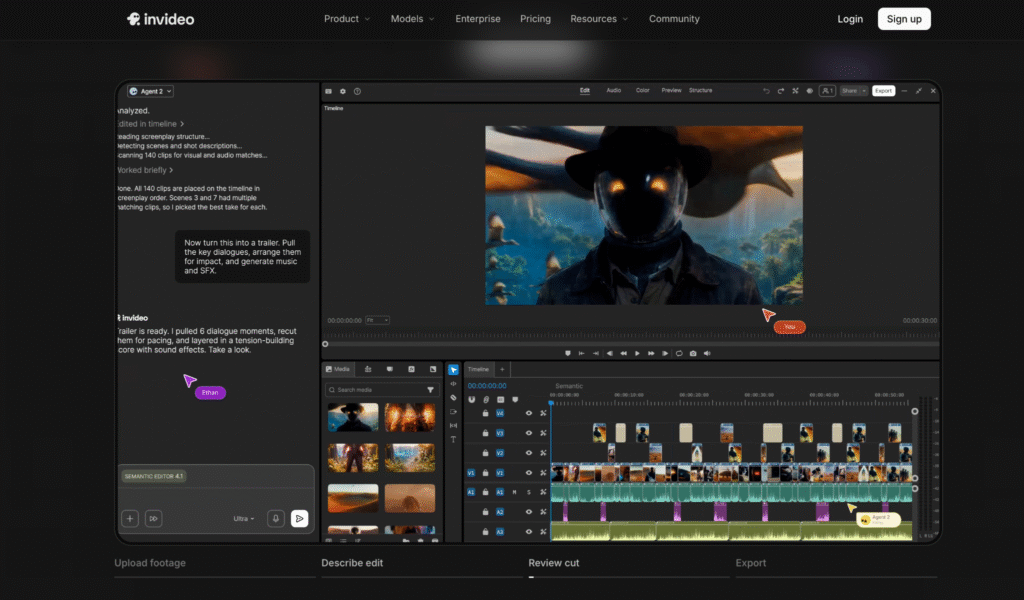
Invideo Editor lets you edit videos online with a real, frame-accurate timeline and AI agents that can be directed to clean up dialogue, cut filler and dead air, and turn one long episode into multiple platform-specific cutdowns, all inside the same browser-based project. The timeline itself is an actual professional manual editor, which is free to use regardless of AI involvement.
- Strengths: genuinely full editing depth for the long-form episode, not just quick clips; agents can turn one episode into several shorts in the same project
- Limitations: doesn’t record remote guests directly; footage or audio needs to be brought in from wherever the episode was recorded
- Pricing: the manual timeline is free to use on its own; full agent-driven work requires a paid plan, Basic $9/Pro $25/Ultra $60 per seat/month
Descript
Descript turns episode editing into editing a transcript directly: delete a rambling tangent or a flubbed line in the text, and the corresponding audio and video cut out too. Overdub corrects a narrator’s mistake without rerecording it by rewriting that line of text.
- Strengths: genuinely fast for trimming dialogue-heavy episodes; Overdub avoids a re-record for the host’s own voice specifically
- Limitations: Overdub only clones the account owner’s voice, not a guest’s, so guest audio mistakes still need to be handled differently
- Pricing: Free tier available; Hobbyist ~$16/month, Creator ~$24/month, billed annually.
Riverside
Riverside records each remote participant’s audio and video locally on their own device rather than streaming it live, which means a guest’s shaky internet connection doesn’t determine the final recording quality. Magic Clips utilizes AI technology to pick out worthy highlights and generate shareable short clips from them.
- Strengths: genuinely solves the remote-guest recording quality problem; Magic Clips speeds up turning one episode into several short highlights
- Limitations: editing depth for the full episode is more limited than a dedicated timeline editor, better suited to clips and highlights than a polished full-length edit
- Pricing: Free tier with limited recording hours; paid plans from roughly $24/month.
Veed
Fast captioning and multilingual translation for video clips are handled by Veed, which has a simple timeline feature in the browser without previous editing knowledge.
- Strengths: genuinely strong captioning and translation tools for clips headed to social platforms
- Limitations: less editing depth than a full timeline editor for the complete episode
- Pricing: Free; paid plans from ~$9/month.
Kapwing
Kapwing is a collaborative browser editor built around shared workspaces, helpful for a podcast team where one person handles clip selection and another handles captions or branding on the same project.
- Strengths: genuinely strong for a team splitting up clip and social content work together
- Limitations: not best at editing a lengthy single episode but better at clipping shorter video bits
- Pricing: Free; paid plans from ~$16/month.
Which Online Video Editor Should A Podcaster Use?
- Need a full, professional edit of the long-form episode itself? InVideo Editor.
- Editing dialogue-heavy content by trimming a transcript? Descript.
- Recording remote guests over an unreliable connection? Riverside.
- Need fast captions and translation for clips? Veed.
- Splitting clip production across a team? Kapwing.
The Bottom Line
Most podcasts end up requiring more than one of these tools at some point: to handle remote recording reliability, something to trim dialogue fast, and something to turn one episode into a week’s worth of short-form content. Few tools cover the full-length episode edit and the repurposing step in the same place.
If the final goal is a properly edited full episode that also produces its own shorts and cutdowns without switching tools, InVideo Editor is built specifically around that combination.
Frequently Asked Questions
1. What’s the best online video editor for editing a full podcast episode?
Ans: Invideo Editor is built for this specifically: a full professional timeline with AI agents that can clean up dialogue and cut down a long recording, not just a transcript-trimming tool for quick edits.
2. Which tool is best for recording remote podcast guests?
Ans: Riverside is built specifically for this, recording each participant locally on their own device so a guest’s internet connection doesn’t affect the final recording quality.
Ans: Yes. Riverside’s Magic Clips and the agents inside InVideo Editor can both identify and extract shareable moments from a full episode, formatted for different platforms.
Ans: Descript, Riverside, Veed, and Kapwing all have free tiers with some limitations. The manual timeline on InVideo Editor is free to use on its own, with paid plans required for full AI agent access.
3. Can one episode be turned into several short clips automatically?
4. Is there a free way to test these tools before committing to a podcast workflow?