Designing professional invoices is a key part of running a successful business. Whether you’re a freelancer, consultant, or a small business operator. These help you get paid quicker while also maintaining a professional image.
Fortunately, modern tools have made this process even easier, with Google Docs invoice templates becoming one of the most popular solutions, allowing businesses to create, edit, and share documents virtually anywhere with just an internet connection.
This article explores the benefits of such platforms and shares tips for creating invoices that improve cash flow and client relationships.
What Is a Google Docs Invoice Template?
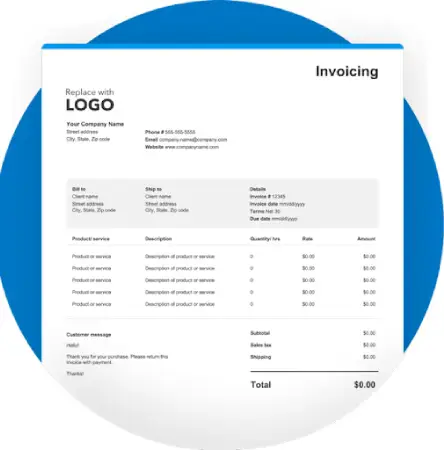
A Google Docs invoice template is a pre-designed document that assists businesses in creating invoices consistently and easily. Rather than building an invoice from the beginning every time, users simply enter the required information, customize the document, and send it to the clients.
Templates typically include sections for:
- Business information
- Client details
- Invoice number
- Invoice date
- Payment due date
- Description of services or products
- Quantity
- Price
- Taxes
- Total amount due
- Payment instructions
Using a structured template reduces errors and saves valuable time.
Benefits of Using Google Docs Invoice Templates
Many businesses choose Google Docs because it combines simplicity with flexibility.
Some of the biggest advantages include:
- Easy to customize
- Cloud-based access
- Automatic saving
- Free to use
- Professional appearance
- Simple sharing options
- Real-time collaboration
- Compatible with multiple devices
These features make Google Docs an excellent choice for businesses of all sizes.
Save Time with Ready-Made Templates
Designing invoices manually becomes a repetitive task, especially when you need to send multiple invoices every month.
Templates help businesses:
- Maintain consistency
- Reduce formatting work
- Improve efficiency
- Minimize mistakes
- Speed up billing processes
A ready-made layout allows users to focus on their work instead of document formatting.
Customize Every Invoice
Every business has different branding and billing requirements.
Google Docs allows users to customize:
- Company logo
- Fonts
- Colors
- Contact information
- Payment terms
- Currency
- Service descriptions
Customization creates a more professional experience for clients while reinforcing brand identity.
Improve Accuracy
Accurate invoices reduce payment delays and minimize misunderstandings.
Always verify:
- Client information
- Invoice numbers
- Dates
- Service descriptions
- Pricing
- Tax calculations
- Payment instructions
Taking a few extra moments to check an invoice before sending it ahead can prevent costly mistakes.
Collaborate with Team Members
One of Google Docs’ biggest advantages is real-time collaboration.
Business owners and team members can:
- Edit invoices together
- Review billing information
- Leave comments
- Approve changes
- Access the latest version instantly
This feature is especially useful for agencies and growing businesses.
If you’re interested in exploring additional invoice layouts and customization ideas, click here. To discover more Google Docs invoice template options that can simplify your billing workflow.
Best Practices for Professional Invoices

A professional invoice should always include complete and accurate information.
Recommended elements include:
- Business name
- Business address
- Client name
- Invoice number
- Date issued
- Due date
- Itemized services
- Payment methods
- Contact information
- Thank-you note
A clean and organized invoice helps build trust with clients.
Organize Your Invoice Records
Keeping invoices organized makes accounting much easier.
Helpful tips include:
- Save invoices by month.
- Use consistent invoice numbers.
- Create folders for each client.
- Store backup copies.
- Track payment status.
- Archive completed invoices.
Good record-keeping simplifies financial reporting and tax preparation.
Common Mistakes to Avoid
Avoid these common invoicing mistakes:
- Missing payment due dates
- Incorrect calculations
- Missing contact information
- Unclear service descriptions
- Duplicate invoice numbers
- Forgetting payment instructions
Carefully reviewing invoices before sending them helps avoid unnecessary delays.
Why Businesses Prefer Cloud-Based Invoicing
Cloud-based invoices provide many advantages over traditional document storage options.
Benefits include:
- Secure online storage
- Easy accessibility
- Automatic saving
- Faster collaboration
- Reduced paperwork
- Improved organization
Such features enable organizations to manage invoices more efficiently from anywhere.

Tips for Faster Payments
To encourage prompt payment:
- Send invoices immediately after completing work.
- Include clear payment terms.
- Offer multiple payment options.
- Follow up politely before the due date.
- Maintain professional communication.
- Keep invoice formatting simple and easy to read.
These habits can improve cash flow and strengthen client relationships.
Conclusion
Google Docs invoice templates showcase a practical, affordable, and professional solution for businesses that want to simplify their billing operations. They also help save time, improve accuracy, and make invoice management easier through cloud-based access.
By customizing templates, maintaining organized records, and following professional invoicing practices, businesses can improve efficiency, strengthen client relationships, and encourage faster payments. Whether you are a freelancer or manage a growing company, Google Docs invoice templates offer a reliable way to create polished invoices with minimal effort.
Frequently Asked Questions (FAQs)
1. What is a Google Docs invoice template?
Ans: It is a pre-designed document that enables users to quickly create professional invoices by entering business and client information.
2. Is Google Docs free to use?
Ans: Yes, Google Docs is available with a free Google account, making it an affordable solution for freelancers and small businesses.
3. Can I customize an invoice template?
Ans: Yes, you can edit colors, fonts, logos, payment terms, and other details to match your business branding.
4. Can I access my invoices from different devices?
Ans: Yes, since documents are safely stored in Google Drive, they can be accessed from computers, tablets, and smartphones.