
Employee Profile Settings Management with Managetrix
The basis of every HR process is accurate employee records, from the payroll system to shift planning. Managetrix Profile Settings ensures that every employee has a secure platform where they can easily view and update their own personal and professional information, while also giving HR full visibility and control. What this system provides is a process with fewer back-and-forth emails, faster updates, and records your team can use and trust.
Here, we explore how our module works, what each tab explains, and how it fits with the rest of the Managetrix HR platform.
See how employees can update their own details while HR remains in control
What is the meaning of Profile Settings Management?
Profile Settings Management is an essential part of the HR system where the information of every employee is stored, viewed, and updated. In many companies, the process still involves sending emails to HR or via chat and waiting for someone to edit a spreadsheet, while ensuring that nothing is omitted.
Managetrix replaces this entire process of back-and-forth by providing a self-service profile, where employees are free to access and see their own details, such as name, email, employee ID, phone number, team allocation, and others. The system also allows them to edit any field on their own. HR admins will still have access to the fields, and they can still manage records across the organization. The self-service portal ensures that everything is in one place, organized under specific tabs, so that nothing is scattered across files.
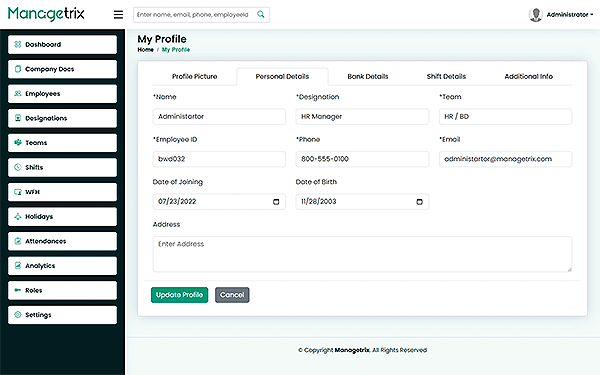
The Profile Settings section on Managetrix is divided into five different tabs, so that both employees and HR can find the correct information by accessing a tab, rather than scrolling through the entire form. These are the tabs that you will find in the Profile Settings section.
From basic details like name, email, and phone number to essential identifiers like employee ID and team allocation, everything is organized under intuitive tabs. The Profile Settings section is segmented into five focused tabs:
Every employee has the chance to upload a new profile picture in just a few clicks. A clear and recent image allows colleagues to recognise you across teams and locations, and make internal directories and team views more personal.
This is the core tab where all your personal details are stored. From your name and designation to your contact information and date of birth, you can access everything here. Keeping these fields current and updated means that HR can reach employees quickly and the records match what is used in payroll and other documents.
All payment-related details are stored in a different tab, away from the general details. If there are any changes, employees have the option to keep their payment information current, and access stays limited by roles. This ensures accurate and timely payroll.
This section is used to assign or update working shifts, so that both employees and managers can see the work schedule. This also assists in shift planning and attendance records, which prevents any mismatches between planned and actual hours.
Every role has its own data needs. This tab allows teams to add any extra information that is relevant to their role or department. Your profile shows how your organization actually works, rather than forcing every single record into one template.
Real-time Updates without HR Bottlenecks
Want to change your phone number, address, or even shift? Well, Managetrix allows employees to edit any detail themselves with a simple Update Profile button. HR is no longer needed for routine changes, and this saves a lot of time and reduces any form of typing errors that happen when data is re-entered by someone else.
Additionally, when routine changes are managed by employees themselves, HR teams can spend their time focusing on work that needs actual judgement, such as policies, onboarding, and employee support.
There are multiple reasons to have self-service profiles in place for your company. First, consider how you currently address record-keeping. The growing pain of small changes means each request eventually ends up in the HR inbox with a likelihood of a mistake or a delay. Having self-service profiles allows individual employees to manage their own profile details.
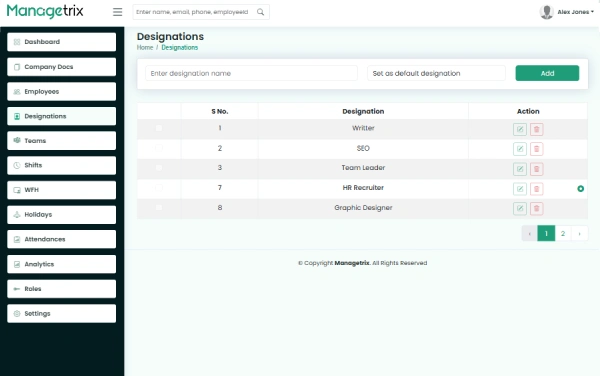
When employees are in control, you need some boundaries and access controls to keep your HR department and processes in line. This is where you can define specific user Roles & Designations. If your company has high standards for data privacy, it’s worth reviewing how we address security in Managetrix and exploring the available self-hosting options.
Simple and Easy Navigation for HR Managers and Employees
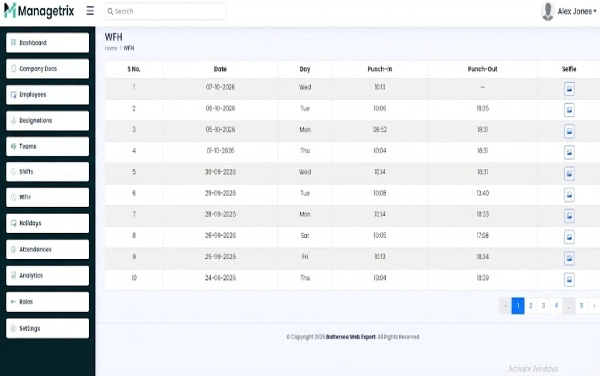
Whether you are an HR manager navigating the details of hundreds and hundreds of employees, or you are a team member updating your personal details, the interface of Managetrix stays clean and allows you to make any changes easily. We have a left-side navigation menu that links you directly to different areas, such as Attendance, Analytics, and Shift Management, so that users can easily move between tasks without searching for them.
Having a simple layout also means less training for new employees and less support effort for HR
Why are Self-Service Profiles Essential for Growing Teams?
As a company grows, small data changes can increase the workload: a new phone number, a changed shift, or even an updated bank account. Every change request landing in HR’s inbox has a risk of delays and errors.
Having a self-service profile spread that allows employees to change their own details ensures that HR can stay in control of role-based access. For US businesses with constant shift changes and distributed teams, this results in fewer payroll corrections, cleaner records for audits, and a smoother transition and start for new employees.
How Profile Settings are Integrated and Incorporated with other Managetrix Features?
Profile data is only useful when the rest of your HR systems can see and use it. Here at Managetrix, profile settings are also integrated with other core modules:
Exploring the Advantages of Profile Settings Management
Profile Settings Management with Managetrix also provides organizations with several benefits:
Reduce HR admin work and keep records accurate.
Explore plans that fit your team size, or talk to our sales team for your setup.
Steps to update a profile in Managetrix
As an employee, you need to follow the following instructions to update your profile in Managetrix.
Access Profile Settings from your Managetrix account.
Now, you need to choose the tab that you want to edit: Profile Picture, Personal Details, Bank Details, Shift Details, or Additional Information.
Update the fields that you have permission to edit.
Lastly, you need to press the ‘Update Profile’ tab to apply all changes.
Why Profile Settings Matter
Keep accurate personal and job-related data.
Allows employees to manage their own profiles.
Simplify payroll and communication processes.
Reduce administrative overhead.
Improve compliance with up-to-date records.
You control, not in a vendor’s cloud. For current licence options, see Pricing.
Profile Settings: Spreadsheet vs Per-Seat Cloud HR vs Managetrix
| Spreadsheet or email | Per-seat cloud HR software | Managetrix | |
|---|---|---|---|
| Employees update their own details | No, changes go through HR | Usually | Yes, with Update Profile |
| Separate tabs for personal, bank, and shift details | No | Varies | Yes, five tabs |
| Access limited by role | No, anyone can copy the file | Usually | Yes, permission-based |
| Where employee data sits | A shared file | The vendor’s cloud | Your own server database |
| How you pay | Free | Per user, per month | One-time licence |
The per-seat column describes typical cloud HR tools; features vary by vendor.
Try Profile Settings in the Live Demo
- Open the demo: Click Try Demo and sign in.
- Open Profile management: Find it in the left-side menu.
- Edit a field: Choose a tab, such as Personal Details, and change a value.
- Apply it: Click Update Profile and check that the change is saved.
From Demo to Your Own Server: How Buying Works
- Try it: Explore the public demo.
- Talk to sales: share your module requirements and team size through Contact Sales.
- Pay once: Buy the licence once, by card or bank transfer.
- Install: Installation is completed within 3 working days.
System requirements and support: you need a Linux server or VPS with Node.js. Our team or your IT team can install it, and installation help and bug fixes are included for 3 months with the paid licence.
Frequently Asked Questions
Which fields can be edited by employees in Managetrix profile settings?
Employees can edit and update details like their phone number, address, and shift details. However, the exact fields also depend on the permission given by your admin.
Who can access your bank details?
Bank details on Managetrix are permission-based. Employees can view and edit their own information, whereas admins have a broader visibility based on their role.
Are profile changes applied immediately?
Yes, as soon as you click on the ‘Update Profile’ tab, the change is applied on the portal.
How does profile settings management reduce HR workload?
When employees handle routine changes themselves, HR spends less time on data entry and more on other tasks.
Can I try Profile Settings before completing the sale?
Yes, you can easily try the Managetrix demo or contact our sales team. You can also review the FAQs and our Pricing page.