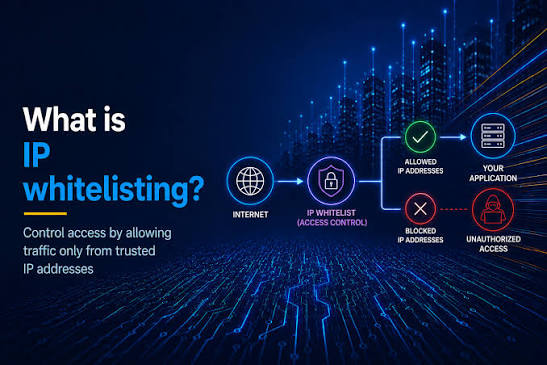
IP whitelisting is actually an access control method that accepts connections only from a predefined list of source IP addresses and refuses everything else. The check often runs even before any checks or session cookie is evaluated. This is the reason it works as a default-deny filter: an address that is not on the list never reaches the application behind it.
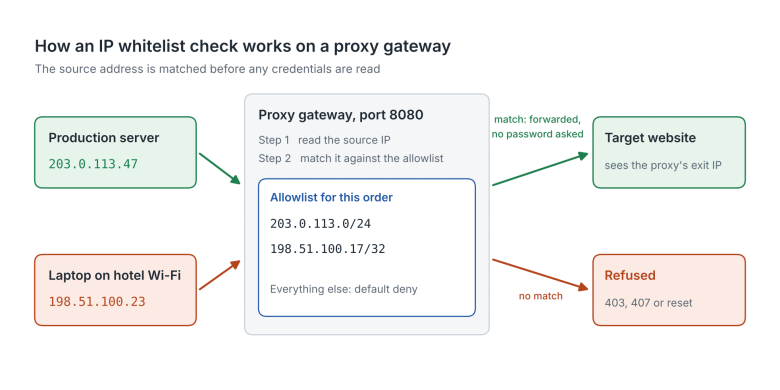
Picture a proxy gateway listening on port 8080. A connection arrives from 203.0.113.47; the gateway finds that address in the customer’s list and forwards the request without asking for a username. A second connection, from 198.51.100.23, is refused with a 403, a 407 challenge, or a dropped socket, depending on how the provider built its gateway.
What IP Whitelisting Means in Practice
The term comes from firewall jargon, and the same mechanism shows up under various names. The UK’s National Cyber Security Centre changed to “allow list” in 2020, most developer documentation now writes “allowlist”, and proxy dashboards label the feature “IP authorization” or “whitelisted IPs”. Search a provider’s docs for all of them before concluding a feature is missing.
A blacklist, or denylist, inverts the logic. It accepts every source except known bad ones, which suits a public website fighting scrapers or brute-force bots. IP whitelisting matches resources with a short, known set of clients: an admin panel, a database port, an internal API, a paid proxy pool.
The price is maintenance. Every legitimate client must be registered before its first request, and every address change gets an outage until someone edits the list.
How IP Whitelisting Works
The decision is based on one value: the source address of the incoming connection. Behind a load balancer, applications usually read it from the X-Forwarded-For header instead, and that header is only trustworthy when your own load balancer sets it.
If the application allows X-Forwarded-For from any client, anyone can type an allowed address into a request header and walk past the allowlist. Strip or overwrite the header at the edge.
Where the Check Runs
At the network layer, the filter is an iptables or nftables rule, an AWS security group, or an Azure network security group. Packets from unlisted sources are dropped before the TCP handshake completes, so the client sees a timeout instead of an error page.
At the application layer, nginx’s allow and deny directives return a 403, and Squid answers with its access-denied page. SaaS products reveal the same idea as a setting: GitHub Enterprise Cloud has an IP allow list, and MongoDB Atlas has an IP access list.
A commercial proxy gateway sits in between. The provider saves your address against your plan, zone, or order, matches each incoming connection against it and, on a match, routes the traffic without a Proxy-Authorization header. On a self-hosted Squid server, the same policy takes five lines:
acl office src 203.0.113.0/24
acl ci_runner src 198.51.100.17/32
http_access allow office
http_access allow ci_runner
http_access deny all
Squid reads http_access rules top to bottom and stops at the first match. When nothing fits, it applies the opposite of the last rule, so the explicit deny all is technically optional. Keep it anyway; the next person who edits the file will read the intent at a glance.
IP Whitelisting vs. Username and Password for Proxy Access
Nearly every proxy provider provides both methods. The right choice depends more on where your traffic originates than on which method sounds more secure.
| Factor | IP whitelisting | Username and password |
| What the gateway checks | Source IP of the TCP connection | Proxy-Authorization header (HTTP) or the SOCKS5 username/password exchange |
| Credentials on the wire | None | Readable on the client-to-proxy hop: Base64 for HTTP Basic, clear text for SOCKS5 (RFC 1929), unless that hop runs over TLS |
| Tools with no proxy-auth fields | Work with host: port only | Fail or need a wrapper. Chrome cannot send credentials to a SOCKS5 proxy at all |
| Client IP changes (home ISP, mobile, autoscaling) | Access breaks until the entry is updated | Unaffected |
| Several users behind one NAT address | All of them get in; traffic can’t be split per user | Each user gets a login and separate usage stats |
| Leaked proxy list | Useless from any other network | Works anywhere until the password is rotated |
| First request from a browser | No challenge round trip | Browser sends the request without auth, receives 407, then retries |
| Typical provider limits | One to ten entries by default at several providers; IPv4 only at some | Extra proxy users are sometimes a paid add-on |
The leak row concludes most arguments. A proxy list with embedded credentials pasted into a ticket, a Slack thread, or a public repository works for whoever finds it. The same list protected by IP whitelisting is vague outside your network. Credentials win the moment your egress address stops being predictable.
How Proxy Providers Implement IP Whitelisting
Limits vary more than marketing pages suggest. The comparison below is created from each provider’s public documentation; these numbers change, so recheck them before you design around one.
| Provider | Default capacity | Scope and formats | Constraints worth knowing |
| Proxys.io | Not published; set per order in the dashboard | Access by IP applies to the whole order, not to single proxies | Login and password ship with every proxy; rotating proxies accept credentials only |
| Bright Data | No limit | Per zone; single IPs, /24 subnets, ranges, netmasks; managed in the panel or via API | Docs recommend a fixed outgoing IP, such as a NAT gateway, for cloud scrapers |
| Oxylabs | Up to 10 IPv4 addresses (datacenter, dedicated ISP, mobile); more via support | IPv4 only; one mobile instance per IP at a time | SOCKS5 does not work with whitelisted IPs on mobile; credentials advised on AWS |
| Decodo | Ten slots by default (ISP pay-per-GB) | IPv4 only for mobile whitelisting | Mobile whitelisted-IP auth supports HTTPS requests only; credentials advised on AWS |
| Webshare | One IP per account; unlimited with a paid add-on | An IP can sit on one account and one plan at a time | Residential plans with IP auth use ports up to 29,999 |
| IPRoyal | Not stated in the docs | Each entry binds an IP to a port and a saved targeting configuration; REST API available | Targeting is fixed per entry, so a new country means a new or edited entry |
Two patterns stand out. Entry caps for IP whitelisting range from one address per account (Webshare’s default) to no cap at all (Bright Data). And several providers offer something from IP-based access: IPv6 entries at Oxylabs and Decodo, SOCKS5 on Oxylabs mobile proxies. If your stack is based on one of those, credentials are the only option on that product.
How to Whitelist an IP Address for a Proxy
The dashboard steps for IP whitelisting vary by provider, but the sequence below avoids the mistakes behind most support tickets.
- Find the public address of the machine that will send traffic, from that machine, with any VPN switched off: curl https://api.ipify.org. Checking from your laptop while the scraper operates on a server registers the wrong address.
- Compare that result with the WAN address your router reports. If the router reveals something in 100.64.0.0/10, your ISP uses carrier-grade NAT and the public address is shared with other subscribers. Use credentials rather.
- Add the address in the provider’s dashboard as a single IPv4 entry. Include a range only when you control every address in it.
- Eliminate the username and password from the client configuration and connect with host: port only. Most gateways tolerate leftover credentials, but deleting them proves the allowlist is what grants access.
- Verify with curl -x http://PROXY_HOST:PORT https://api.ipify.org. The response should show the proxy’s exit address, not yours.
- Record who added the entry, for which job, and when it should be removed.
The last step looks like paperwork. It is also the only defense against the slow change that turns a ten-entry list into forty entries nobody can describe.
Is IP Whitelisting Secure?
Spoofing gets mentioned first and matters least. For TCP services, for example, HTTP proxies, a forged source address cannot finish the three-way handshake, because the SYN-ACK goes to the real owner of that address. Spoofing is an actual concern for UDP and for flood attacks, not for logging into your proxy pool.
The practical risks are shared addresses and stale entries. Office NAT puts all employees on a floor behind one address. Mobile carriers usually run carrier-grade NAT (RFC 6598 reserves 100.64.0.0/10 for it), so whitelisting a phone hotspot admits strangers who share that exit.
Cloud addresses get recycled too. Release an Elastic IP, and AWS can give it to another customer, while your allowlist still trusts it.
IP whitelisting answers “where is this connection coming from”, not “who is sending it”. Treat it as an outer filter and keep credentials, API tokens, or MFA on anything that holds data or money.
Dynamic addresses, IPv6 and dual-stack clients
Many home broadband connections get a new address after a router reboot or a DHCP lease change, and access breaks with it. IPv6 adds its own trap. Operating systems create temporary addresses under RFC 8981 and rotate them, so a single whitelisted IPv6 address can stop matching within a day. If a provider accepts IPv6 entries at all, register the /64 prefix.
Dual-stack clients cause quieter failures. If the gateway hostname resolves to both A and AAAA records, the client might connect over IPv6 and present an address you never registered, even though the IPv4 entry is correct. Forcing IPv4 (curl -4) or connecting to the gateway by IP address eliminates the ambiguity.
Cloud Workloads with Changing Egress IPs
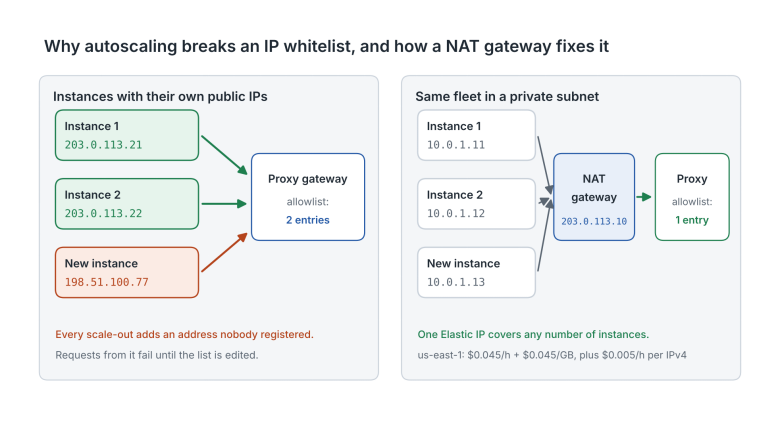
Autoscaling breaks IP whitelisting by design. A scraper fleet that grows from 2 to 12 instances overnight gets 10 new public addresses, none of them registered, and the jobs fail with authentication errors at an hour when nobody is watching.
The standard fix is to send outbound traffic through one fixed address. On AWS, that means private subnets behind a NAT gateway with an Elastic IP, so the allowlist requires a single entry no matter how many instances run.
That address has a price. In us-east-1, the gateway costs $0.045 per hour (about $32.85 a month) plus $0.045 per GB processed, and its public IPv4 address adds $0.005 per hour under AWS pricing in force since February 2024. A job pushing 500 GB a month pays about $59 for the gateway and its address before standard egress charges. When that exceeds the proxy plan itself, credentials are the cheaper answer.
Troubleshooting a Rejected Whitelisted IP
When a client that worked yesterday gets refused today, the cause is almost always on this short list:
- The public address changed. Repeat the ipify check from the machine that generates traffic and compare it with the dashboard entry.
- A VPN, corporate proxy, or browser extension is routing the request, so the gateway views that exit rather than yours.
- The client connected over IPv6 while only IPv4 is registered.
- The address is registered on another plan, zone, or account. Some providers shift an IP to whichever account authorized it last; others allow it on one instance at a time.
- The product or protocol doesn’t accept IP-based access. Rotating proxies and SOCKS5 are the usual exceptions, and the provider comparison above shows where.
On gateways that support both methods, a 407 response is a useful clue: the gateway did not match your address and fell back to asking for credentials. The HTTP 407 troubleshooting guide on the Proxys.io blog includes that error in browsers, curl, Python, and git.
It also describes why Chrome cannot pass credentials to a SOCKS5 proxy, which makes IP-based access the practical way to run SOCKS5 in that browser.
When the Provider’s Whitelist Model Becomes the Constraint
Shifting providers over IP whitelisting alone rarely makes sense, but the whitelist model often exposes a mismatch. The signs are particular: you keep hitting the entry cap and paying for an add-on to raise it, the product you want refuses IP access, or one address can’t be shared across the plans your team runs.
Proxys.io keeps IP whitelisting simple, which fits teams with static servers. Every proxy ships with a login and password, and access by IP can be configured per order in the personal account. A team can bind one order to a production server and keep another on credentials for laptops.
IPv6 proxies are issued in IPv4 format through a tunnel, so the address you whitelist is still your ordinary IPv4 egress. All products run over HTTP(S) and SOCKS5, and a 24-hour refund window leaves time to confirm the setup works with your tools. Rotating proxies need credentials, so plan rotation jobs around username and password from the start.
Which Method to Choose
Use IP whitelisting when traffic leaves from a few addresses you control and expect to keep for months: a dedicated server, an office line with a static IP, a NAT gateway with an Elastic IP. Use credentials when clients roam, autoscale, or share an exit with people outside your team.
For combined setups, split the work by order or plan. Allowlist the production servers, issue credentials to everyone else, and review the list every quarter, deleting any entry nobody can explain.
Frequently Asked Questions
1. Does IP whitelisting replace a password?
Ans: For proxy access from a static server, it can: the provider accepts the connection on source address alone. For anything that holds user data, use both. The allowlist removes background scanning and brute-force noise, while credentials or tokens identify who is acting.
Ans: Only with automation. Several providers document APIs for adding and removing whitelist entries, so a scheduled script can push the new address after each change. Without that, a dynamic address means periodic outages, and credentials fit better.
Ans: A firewall is one place to enforce IP whitelisting. The same allowlist logic lives in web servers, SaaS admin settings, and proxy gateways. The difference is the layer: a firewall drops packets silently, while an application-level allowlist returns an error the client can read.
2. Can you whitelist a dynamic IP address?
3. Is an IP whitelist the same as a firewall?