Small businesses need HR software, but unlike their larger counterparts, they often have less room for mistakes when choosing the wrong HR tool. There are many reasons for that, like budget issues to afford the full costs of implementing an HR solution. Their HR and IT competencies and capacity (there may be only one HR and IT specialist) may not match the requirements of a tool’s integrations, including employee training and software error management.
Besides all these, there are many other obstacles that could halt HR platform selection. This guide will help you mitigate most risks of choosing the wrong human resource software provider.
Define Your HR Needs and Must-Have Features
Modern HR software solutions can do everything online: from automating recruitment processes to managing employee training and upskilling. Almost every HR tool promises to include these features, and you look at these impressive lists and think, “That’s an actual game-changer for my company and my team”.
Here lies the first and most impactful trap in selecting human resource software for small businesses—buying a tool that you cannot afford in the long run, nor can you use or manage all of its features.
Someone on your team will have to set all those features up and keep them functioning. In a small business, that might be the same person who manages payroll, answers employee questions, and orders office supplies.
That’s why, before buying a tool, it’s worth answering a few simple questions:
- Which HR tasks take up the most time each week?
- Where do most mistakes or delays happen?
- What do employees regularly need help with?
Begin your HR software comparison with a clear list of the tasks your team needs help with. Only look for software that can meet the requirements of your small business. If an all-around tool, check if it can be customized to give you what you want and nothing else, with no additional (and unnecessary!) charges.
Once you’ve checked tools that meet your needs, look at the providers behind them. Customer reviews, useful HR guidance, and case studies from businesses like yours can support you in assessing a provider’s digital authority. Look for evidence that they understand the challenges of small teams and have helped the same customers solve them.
Compare Pricing and the Total Cost of Ownership
The advertised price of small business HR software may tell you very little about what you’ll really spend. A low base subscription cost that you see on their website may come with substantial extra fees and extra charges. Likewise, a low per-employee rate can be misleading if you have to pay for more seats than you need.
Therefore, ask each provider for a written quote based on your employee count and needed features. Besides a base subscription fee, identify whether there’s a minimum monthly charge or a minimum number of paid users.
Your aim is to accurately estimate the total cost of ownership. Usually, it includes:
- Setup and migration: Installing the tool into your local system, importing your employee records into the new tool, configuring all the workflows or adding new ones, as well as connecting existing tools.
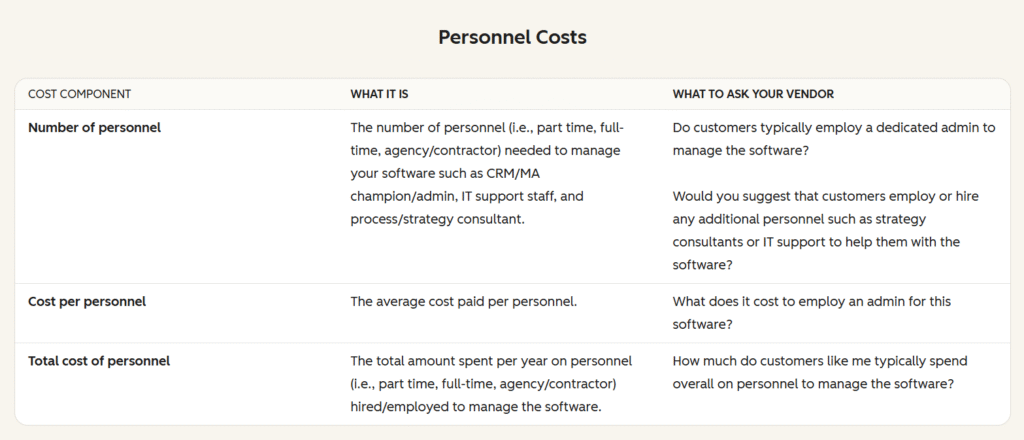
- Required extras: Error handling, payroll connections, additional storage space for growing employee records, reporting, people management expenses, or other features not visible in the base plan.
- Training and support: Calculate the total costs of your HR team training and the total yearly cost of support.
- Internal staff time: Hours spent preparing data, learning the system, and managing it.
Interestingly, the costs associated with personnel training and software implementation are usually the ones that get overlooked:
It helps to precisely study the terms of use before signing up for the new tool. Any renewal increases, cancellation deadlines, and any data-export fees need to be explained upfront. All these can be done before you land on a particular tool, and when you still have multiple shortlisted candidates.
Test Everyday Tasks During Demos and Free Trials
When testing HR software for small companies, ask the person who normally manages each task to complete it during the trial. Note where they get stuck, need help, or have to complete the work outside the platform.
For example, imagine you wanted a tool that would allow you to run employee surveys to test and improve employee engagement. Your early survey routine focuses on running one big, annual survey, and supplementing it with two or three smaller, or pulse surveys in between (to measure the progress in employee engagement).
However, the HR tool you hastily subscribed to lets you run only annual surveys, or surveys where you need to construct your respondent database from scratch, i.e., manual work for you. Or this tool only includes one survey per year, while you need more, but that would already exceed your HR budget by far.
To avoid such conditions, we recommend testing your everyday tasks during free trials, and at least questioning the development team about all software capabilities that you need now or may require in the future.
Apply the same testing approach to any AI features included in the platform. When evaluating AI tools for small businesses, check how much work remains after the tool produces an outcome. For example, if the tool was used to summarize employee answers to open-ended questions, check a few random answers to see whether the tool managed to capture common issues.
Check Integrations, Data Security, and Access Controls
Software integrations, data security, access controls, and similar technical details may look like minor things, but they can all have big negative implications if not clarified in advance. For instance, an integration might transfer employee information but leave working hours or deductions for someone to enter manually. You don’t want to discover this when you’re deep into the launch phase.
It’s worth checking the information that affects your everyday work first:
- Which system fields sync, and does data move seamlessly in both directions?
- Do updates happen automatically or need a manual export?
- Are updates part of the subscription at all?
- How are failed transfers flagged, and who fixes them?
- Does access control management cost extra?
Don’t overlook the security aspect. Whatever concerns your employees’ personal information and records must be prioritized and protected.
In practice, it means that before buying any tool, you need to request written details about encryption, backups, and account protection. Check whether multi-factor authentication is available and whether backups are available for instances when records become damaged or lost.
Also, ask where employee data is stored and how the provider manages security incidents. The type of server matters a lot in this case. Ideally, you want your employee data to sit on a good infrastructure, instead of a shared one. You will enjoy dedicated hardware resources, faster internet speeds, and won’t rely on any third parties messing around with the server configurations.
Compare Providers Using a Simple Scorecard
Similar to HR and other business processes, an inspection of your potential software development provider will be easier, and the output will be of good quality if you use a structured approach.
A scorecard is a good example of such a structured approach. It offers your HR software comparison a consistent structure, making it simpler to see where each provider meets or falls short of your requirements. The aim is to evaluate all HR software providers against the same criteria and keep all your records in one place. That’s exactly what a scorecard is used for.
To define your HR software requirements, ask your HR, IT, and management staff which workflows, data, and permissions the system needs to support. Use their answers to decide what belongs in your scorecard.
Based on what we have discussed in this post so far, your simple scorecard can look like this:
| Evaluation criteria | Provider A | Provider B | Provider C |
| Covers your must-have HR tasks | /5 | /2 | /4 |
| Easy for employees and administrators to use | /4 | /5 | /5 |
| Total cost fits your budget | /3 | /5 | /5 |
| Integrations handle the data you need | /5 | /1 | /5 |
| Security and access controls meet your requirements | /5 | /5 | /3 |
| Setup and support match your team’s capacity | /2 | /2 | /5 |
| Can accommodate your expected growth | /4 | /2 | /5 |
| Total | /28 | /22 | /31 |
Before comparing totals, remove any provider that fails a non-negotiable requirement. A high overall score cannot compensate for a missing payroll connection or a price above your budget.
If two providers end up having similar or comparable scores, consider which one of them performs better on your most critical tasks. Obviously, the better pick will be the one that can handle your HR and business-critical tasks and do so on the lowest budget.
Conclusion
HR functions in small companies are not different in nature from their counterparts in big businesses and enterprises. The main difference lies in scope, which has significant financial and human capabilities.
In other words, small businesses must be picky with HR solutions. The cost of committing to the wrong tool can also mean losing important time and letting more agile competitors get ahead by picking the right tool at the right time.
Your small business can mitigate these risks by adhering to these essential rules:
- Start with the HR tasks you need to improve. Prioritize features that your team must utilize and save on others that don’t apply to your small business.
- Calculate the full cost before committing. Sometimes, initial subscription costs don’t reveal the full costs of actually running the software. Such hidden costs often include setup, migration, training, support, add-ons, and staff time required to master the tool.
- Verify how the software works in practice. It’s essential to test the tool in free trial mode before implementing it in your organization.
- Compare against the same criteria. Design and implement a common scorecard inspection to benchmark your potential HR software providers against the same needs.
Everyone makes mistakes. Small businesses are no exception. But at least the mistakes linked with the selection and implementation of HR software can be anticipated and effectively prevented.
FAQs
1. What HR Software Features Does a Small Business Need Most?
Ans: As a rule, small businesses need basic HR functions like payroll management, maintaining accurate employee records, tracking sick leave, and most recently, employee self-service. Other features include performance reviews, employee onboarding, talent management, employee surveys, and development (training) programs, but it’s unlikely that a small business will need them all.
2. Who Should Be Involved in Evaluating Human Resource Software?
Ans: The immediate HR specialist, relevant IT staff, and management, sometimes even HR management and founders. The exact list of stakeholders may vary from business to business, but participation shouldn’t be limited to a single person, as someone needs to offer feedback. Besides, connected people generally work and evaluate opportunities more effectively.
3. What Should You Check Before Signing an HR Software Contract?
Ans: You need to confirm that the contract includes all the features that your business needs and that you presumably tested during the free trial phase. Also, check the total cost of running the software, as maintenance, bug fixes, security, and updates usually substantially increase the final cost.