HR Software for Healthcare Providers
Healthcare providers work around the clock. Doctors, nurses, technicians, and admin teams all work in different shifts, cover for each other, and need leave that is properly planned so that no department is left short-handed. HR also has to keep staff contracts, certifications, and policies organized and easy to locate.
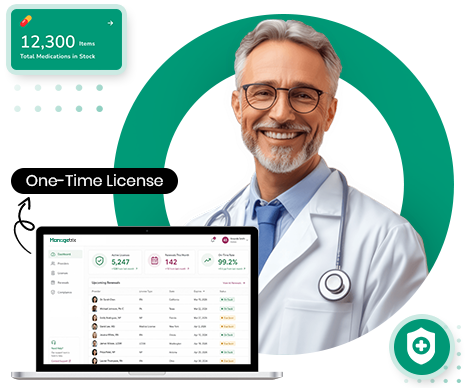
Managetrix is an exceptional HR software that makes multiple tasks easier for HR teams. It brings employee records, shifts, attendance, teams, leave, and documents all in one place and in one system. It is entirely self-hosted and sold as a one-time licence, which means that increasing the number of workers on your team does not raise the price. The system is not clinical or focused on patient records.
HR Challenges Faced by Healthcare Providers
- Roles that cover every hour: Every shift- morning, evening, and night needs to be covered fairly and free of gaps.
- Leave cover: Managers need to see who is on leave before they finalize the next rota.
- Overtime and attendance records: Extra hours need to be properly recorded for every person.
- Per-seat software costs: Per-user pricing grows with every new employee.
- Mixed roles and teams: Clinical, technical, and admin staff need different structures for different teams, titles, and access.
- Staff documents and certifications: Contracts, policy documents, and certification details are easy to lose across spreadsheets, inboxes, and files.
- Scattered records: Job titles and contact details are stored in different files, and no one knows which version is the latest.
How does Managetrix support healthcare teams?
A Week With Managetrix
Heads of departments review the schedule and leave plan before approving the weekly rota.
Employees clock in and out, and all late arrivals and overtime go into their attendance history.
Add a new team member with a designation and a team, and their documents are attached to their profile.
HR can easily review attendance, late, and overtime figures for every employee instead of collecting spreadsheets.
Basic Healthcare HR Tasks and How Managetrix Manages Them
| Healthcare HR tasks | How Managetrix Manages It | Module |
|---|---|---|
| Building the rota | Assign shifts by workload and availability, with predefined rotation rules | Team & Shift Management |
| Recording attendance | Punch in and out with both biometric and manual options | Attendance & Time Tracking |
| Tracking overtime | Monthly view of overtime and late days per person | Attendance, HR Analytics |
| Approving leave | Employee leave requests with status shown on the dashboard | Leave & Holiday Management |
| Keeping staff documents | Documents attached to each employee profile | Employee Management |
| Sharing policies and handbooks | One shared copy for every employee | Company Documents |
| Limiting access to personal data | Roles and permissions set by admins | User Roles & Permissions |
| Processing payroll | Automated payroll processing | Automated Payroll Management |
Set up Managetrix According to Your Teams
The setup of Managetrix by a healthcare provider involves three decisions.
- Teams’ structure: Wards, departments, or administration teams with a designated team leader.
- Designations managed: A list of designations that controls the company directory for consistency in roles across clinical and administrative staff.
- Permissions and access: Set up independently from roles.
Why One-Time License is Suitable for Healthcare
Healthcare providers’ teams increase as their organization expands and creates new clinics, departments, and shifts. Paying per seat for HR software is charged per additional employee on a monthly basis. Managetrix is licensed as a one-time license in three versions: Basic, $499; Standard, $999; and Premium, $1,499.
Healthcare providers’ teams increase as their organization expands and creates new clinics, departments, and shifts. Paying per seat for HR software is charged per additional employee on a monthly basis. Managetrix is licensed as a one-time license in three versions: Basic, $499; Standard, $999; and Premium, $1,499.
Please contact our Sales team to find out which modules you need and what your upgrade and support options are before purchase. Read more on Pricing.
Your Staff Data Stored on Your Servers
Managetrix is entirely self-hosted, which means staff records sit in your own database on your server instead of the vendor’s cloud. You get to decide who can reach the server, how the database is backed up, and which domain and HTTPS certificate you can use.
Managetrix manages HR data for all your employees. You need to know that it is a clinical or patient-records system, so keep patient information in your clinical software. Security depends on how you run your server, so plan hosting, backups, and access rules carefully. Read more about the Security & Self-Hosted page.
Healthcare Providers Managetrix Fits
One integrated solution instead of registers and spreadsheets.
Assign each department its team and leader, with the same job titles across all departments.
Separate access rights but one employee directory.
Days worked remotely will be entered into the same attendance register. See Work From Home Monitoring.
Getting Started with Managetrix
Navigate through the dashboard, employee directory, and designations. Registration is not required.
Inform our sales manager about your number of employees and modules you want to order.
Deploy Managetrix to your server and connect it to your MongoDB database.
Create teams for your departments, then enter/import employees.
Forget about messages from rota and spreadsheets, and use one record for each staff member. Try our demo, or contact us to discuss the best solution for your practice or clinic.
Frequently Asked Questions
Q1. Does Managetrix suit clinics that have shift workers?
Certainly. You will be able to split your employees into teams with leaders, assign shifts according to a rotation schedule, and monitor attendance, tardiness, and overtime.
Q2. Does Managetrix record patient data?
No, Managetrix is HR software that stores your staff records. You need to keep patient information in your clinical software.
Q3. Is Managetrix compliant with healthcare regulations?
Managetrix handles all employee records, not patient records. Compliance depends on how you host and run the software, so check your obligations with your compliance advisor and have a chat with our team about your setup.
Q4. Can I save staff documentation in Managetrix?
Sure. Attach contracts, identification proofs, and other documents to each employee’s profile.
Q5. Will we have to pay more when we hire new people?
No. Since the Managetrix licence is one-time, it will stay unchanged even as you add more employees.
Q6. Where will we store the data about our staff?
On your server and database. Overall security will be affected by your hosting, backups, and access policies.
Q7. Will department managers see all the data about the employees?
If you want to. Admin sets the permissions for users, so every user sees only what is necessary according to their role.pricing page.
Q8. Can staff members see their attendance and vacation records?
Sure. Each staff member has his/her own dashboard showing attendance, vacation days, etc.
Q9. Can staff members update their own profiles?
Sure. Employees can edit their own information, while admins approve or deny the changes depending on your policy.
Q10. Can we test Managetrix before buying?
Sure. Our live demo does not require registration.
Run Your Clinic’s HR from One System
Forget about messages from rota and spreadsheets, and use one record for each staff member. Try our demo, or contact us to discuss the best solution for your practice or clinic.