
Work From Home Monitoring Software for Remote Teams
Hybrid and remote work is quite common for many businesses and organizations in the US, but tracking and managing who is working, when they started, and how long they worked can be a challenging task. Well, the Managetrix Work From Home Tracking replaces all manual efforts with a simple punch-in and punch-out system, which makes it easier for HR managers and admins to handle the real-time records of remote employees and their working hours.
This page will explore everything regarding the WFH module, the dashboard, the attendance panel, and how the data supports other tasks such as payroll, compliance, and productivity reporting.
See WFH tracking in real time.
Learn how Managetrix records remote work hours without any manual input.
Understanding Work From Home Monitoring in HR Software
Work From Home Monitoring in HR software refers to proper records of the working hours and attendance of employees who do not work from the office. Basically, this assists in answering three questions: who is working today, when did they start and when are they finishing, and how many hours did they put in?
If done manually through email, chat messages, or self-reported sheets, these records are quite slow to collect and can contain errors. A dedicated WFH module ensures that every entry is recorded in one place, so that HR can easily review attendance, calculate hours, and even prepare payroll from a single source.
Real-time Visibility on Remote Work
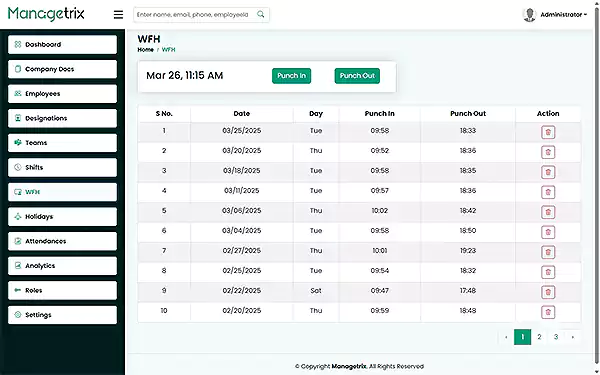
Remote teams work best when the entire process is clear and quick. The dedicated Managetrix WFH dashboard provides both employees and admins with a clean and easy-to-navigate interface to record attendance daily. It displays the following:
 Live date and time stamp
Every punch-in is attached to a clear time reference.
 Easy punch-in and punch-out buttons
Employees start and end their working hours with a single click.
 Detailed daily logs
Each and every single log shows the date, punch-in and punch-out times, and the total working hours.
 Clear action icons
The admin control icons are easily recognizable and easy to use.
Daily Attendance Tracking and Monitoring
The centralized WFH panel shows all remote logged-in entries, which makes attendance monitoring easy for HR admins and managers. The panel provides the following details with every entry:
- A serial number for easy reference
- The date and day of the week
- The exact time of punching in and punching out
- An option to delete incorrect or mistaken entries
The HR admin has complete access and control of the entries and can easily review, adjust, or audit them whenever required. The editing power stays centralized with a single access level, which ensures that all records are consistent and trustworthy. To define who holds all access, see the User Roles & Permissions Management page.
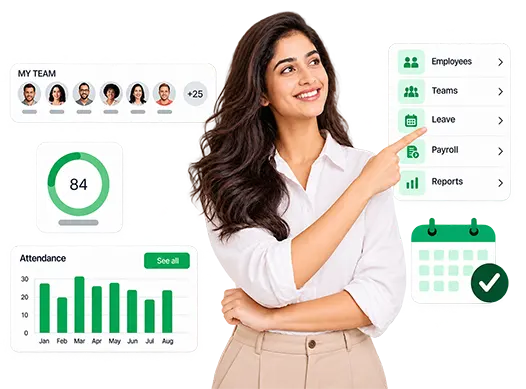
One centralized panel for every remote entry.
Review, correct, and audit WFH attendance from a single interface.
Detailed Calculation of Working Hours
Time logs on the interface for every WFH employee make it easier for HR managers to assess their performance and handle payroll. This active tracking assists them to:
Admins can easily see extra or missing hours for compliance.
They can also work out billable hours for freelancers or contract roles.
Turn work-hour data into insights to understand how remote teams operate.
Since total working hours are recorded every single day, month-end calculations are no longer dependent on memory or manual totals.
Navigate Easily Using Smart Filters
All features within Managetrix’s Work from Home panel can be integrated with the Managetrix Dashboard. There is no need for manual navigation through a directory to reach employees. Different WFH data can be easily accessed through multiple views, and switching between different WFH data views will only take seconds.
Admin view has several features to assist in the efficient use of the Managetrix software:
The ability to search using employee name, ID, phone number, or email address.
A quick navigation menu using pagination for easy navigation through larger sets of data.
Logs can be exported, and data can be integrated with external systems.
These features will turn an extremely long list of data into a quick and easy search.
Why is Work-from-Home Tracking Important?
There are several reasons why work-from-home tracking and monitoring are essential for businesses:
Monitoring that remains Fair and Transparent
Focus monitoring on things that matter and keep it open. Managetrix WFH Module doesn’t use continual surveillance, but it does use working time and punch times to determine monitoring. To be most efficient, you should:
Explain to employees what is being captured and why.
Apply the same guidelines to all remote employees.
Support your fair scheduling of hours and payroll with the captured data, rather than using it for micromanaging.
Learn about the specific labor and privacy laws for your industry and location.
WFH Tracking using Managetrix
Employees punch in to start their workday by opening the WFH dashboard.
At the end of the day, employees punch out to end their workday.
The daily log tracks the day, date, the punch-in and punch-out times, and the total working hours.
The WFH Panel has entries that can be edited or deleted by HR or Admin.
Download the log entries, or connect Managetrix to other payroll and data analytics software.
WFH tracking: Spreadsheet vs. Per-Seat Cloud HR vs. Managetrix
| Spreadsheet or email | Per-seat cloud HR software | Managetrix | |
|---|---|---|---|
| One-click punch-in and punch-out | No | Usually | Yes |
| Daily logs with total working hours | Typed by hand | Usually | Yes |
| Admin review, adjustment, and deletion of entries | Anyone can edit the file | Varies | Yes, centralized admin control |
| Search by name, ID, phone, or email | Manual | Varies | Yes |
| Where attendance is recorded | A shared file | The vendor’s cloud | Your own server database |
| How you pay | Free | Per user, per month | One-time license |
The per-seat column describes typical cloud HR tools; features vary by vendor.
How WFH Tracking Integrates with Other Managetrix Features?
Remote hours are quite useful when they integrate with the rest of your HR system:
Manage remote teams without manual input.
Check plans that match your team size, or have a chat with our sales team about your remote work needs.
Keep every Company Document in one single place.
Provide your team with a simple way to access all the latest policies and guides, and give HR some time back. Start with the Managetrix demo, or have a chat with our sales team regarding our document workflow.
Frequently Asked Questions
Can employees punch in and punch out from home?
Yes. The WFH dashboard has Punch In and Punch Out buttons that allow users to punch in and out with just one click.
What information is contained in the daily log?
Each log has the date, day, punch-in and punch-out times, and working hours.
Is it possible for admins to edit mistakes?
Yes. Admins can control all entries to change or audit them, and the panel has the option to delete incorrect entries.
Is it possible to use WFH data for payroll?
Yes. Logs will help HR managers process payroll easily, and you can download the logs or use the data for payroll and analytics.
How do I see information about one particular employee?
Just use filters to search by name, ID, phone number, or email and switch pages using pagination.